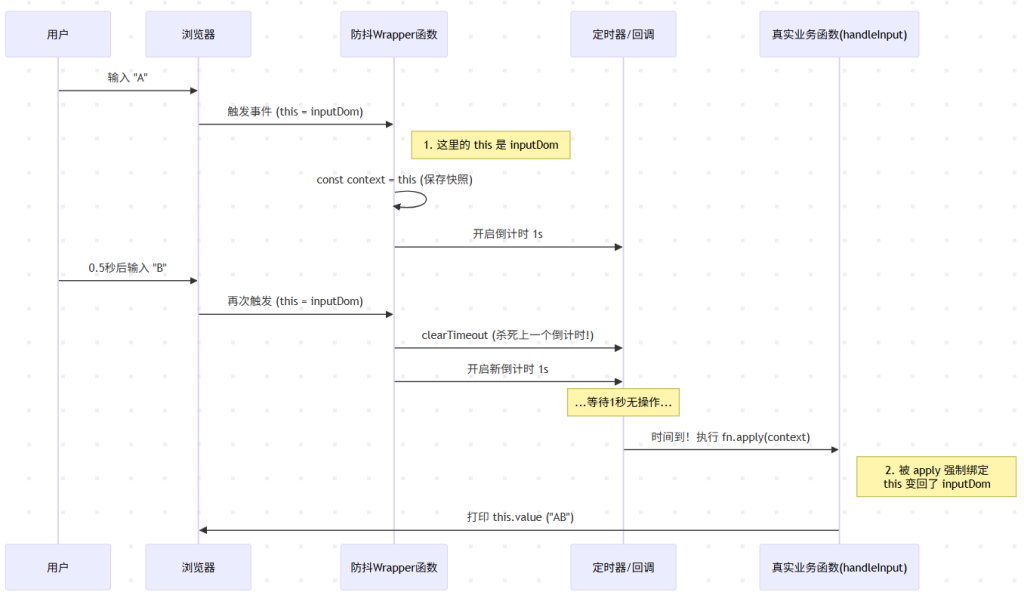
debounce
/**
 * 防抖函数 (Debounce)
 * @param {Function} fn - 需要执行的函数
 * @param {Number} delay - 延迟时间(ms)
 */
function debounce(fn, delay) {
    let timer = null; // 1. 闭包保存定时器

    return function(...args) {
        // 2. 如果定时器还在,说明上一次还没执行完,清除它
        if (timer) clearTimeout(timer);

        // 3. 重新开启定时器,delay 时间后执行
        timer = setTimeout(() => {
            // 4. 这里的箭头函数自动穿透,拿到外层的 this
            fn.apply(this, args);
        }, delay);
    }
}
throttle
/**
 * 节流函数 (Throttle)
 * @param {Function} fn - 需要执行的函数
 * @param {Number} delay - 间隔时间(ms)
 */
function throttle(fn, delay) {
    let timer = null; // 1. 闭包保存定时器标志

    return function(...args) {
        // 2. 如果定时器存在,说明还在"冷却中",直接返回
        if (timer) return;

        // 3. 开启定时器(上锁)
        timer = setTimeout(() => {
            // 4. 时间到了,执行函数
            fn.apply(this, args);

            // 5. 关键:执行完后,把定时器清空(解锁),允许下一次触发
            timer = null;
        }, delay);
    }
}
Example Code
<!DOCTYPE html>
<html lang="zh-CN">

<head>
    <meta charset="UTF-8">
    <meta
        name="viewport"
        content="width=device-width, initial-scale=1.0"
    >
    <title>Debounce & Throttle</title>
    <style>
        body {
            font-family: sans-serif;
            padding: 20px;
            line-height: 1.6;
        }

        .container {
            margin-bottom: 30px;
            padding: 20px;
            border: 1px solid #ddd;
            border-radius: 8px;
        }

        .box {
            width: 100%;
            height: 200px;
            background-color: #f0f4f8;
            display: flex;
            align-items: center;
            justify-content: center;
            font-size: 20px;
            color: #333;
            cursor: crosshair;
            border: 2px dashed #007bff;
        }

        input {
            padding: 10px;
            width: 300px;
            font-size: 16px;
        }

        strong {
            color: #d9534f;
        }
    </style>
</head>

<body>

    <h1>前端面试:手写防抖与节流</h1>

    <div class="container">
        <h3>1. 防抖 (Debounce) 示例</h3>
        <p>场景:搜索框。请在下方连续输入文字,观察 "触发结果"。</p>
        <input
            type="text"
            id="debounceInput"
            placeholder="尝试连续快速输入..."
        >
        <p>实际触发结果:<strong id="debounceResult">等待输入...</strong></p>
    </div>

    <div class="container">
        <h3>2. 节流 (Throttle) 示例</h3>
        <p>场景:鼠标移动。请在下方蓝色区域内快速移动鼠标。</p>
        <div
            id="throttleBox"
            class="box"
        >
            鼠标在这里移动
        </div>
        <p>计数器 (每1秒更新一次):<strong id="throttleResult">0</strong></p>
    </div>

    <script>
        // ==============================
        // 1. 手写防抖函数
        // ==============================


        function debounce(fn, delay) {
            let timer = null
            return function (...args) {
                if (timer) clearTimeout(timer)
                timer = setTimeout(() => {
                    fn.apply(this, args)
                }, delay)
            }
        }

        // ==============================
        // 2. 手写节流函数
        // ==============================
        function throttle(fn, delay) {
            let timer = null
            return function (...args) {
                if (timer) return  //冷却中 不执行
                timer = setTimeout(() => {
                    fn.apply(this, args)
                    timer = null //解锁
                }, delay)
            }
        }

        // ==============================
        // 业务逻辑绑定
        // ==============================

        // 1. 防抖测试逻辑
        const inputEl = document.getElementById('debounceInput');
        const debounceResultEl = document.getElementById('debounceResult');

        // 定义要执行的业务函数
        function handleInput(e) {
            console.log('防抖触发:', e.target.value);
            debounceResultEl.innerText = `发送请求: ${e.target.value} (${new Date().toLocaleTimeString()})`;
        }

        // 绑定事件:延迟 1000ms 执行
        inputEl.addEventListener('input', debounce(handleInput, 1000));

        // 2. 节流测试逻辑
        const boxEl = document.getElementById('throttleBox');
        const throttleResultEl = document.getElementById('throttleResult');
        let count = 0;

        // 定义要执行的业务函数
        function handleMouseMove(e) {
            count++;
            console.log('节流触发 count:', count);
            throttleResultEl.innerText = count;
            boxEl.innerText = `X: ${e.offsetX}, Y: ${e.offsetY}`;
        }

        // 绑定事件:每 1000ms 最多执行一次
        boxEl.addEventListener('mousemove', throttle(handleMouseMove, 1000));

    </script>
</body>

</html>
Life's a struggle, I'll conquer it.