本文最后更新于397 天前,其中的信息可能已经过时,如有错误请发送邮件到1986413837@qq.com
赶进度了 别记来记去了……
1.overflow-y/x : auto 可设置横向/纵向滚动
2.DeepSeek帮我优化的这块很好 要多看看
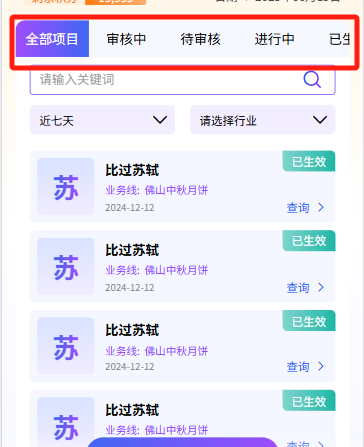
3.要让盒子变成倾斜状态(平行四边形)但保持内容不倾斜,可以使用 伪元素 + transform: skew() 的方法
.tip {
	position: relative;
	/* 确保伪元素定位正确 */
	text-align: center;
	letter-spacing: 1rpx;
	font-size: 26rpx;
	color: #888888;
	margin-bottom: 32rpx;
	width: 356rpx;
	height: 62rpx;
	line-height: 62rpx;
	color: #9438FC;
	text-shadow: 0 0 1rpx #9438FC;
	font-size: 24rpx;
	z-index: 1;
	/* 确保内容在伪元素之上 */
	background: transparent;

	/* 移除原背景,改用伪元素实现 */
	/* 倾斜的伪元素背景 */
	&::before {
		content: "";
		position: absolute;
		top: 0;
		left: 0;
		right: 0;
		bottom: 0;
		background: #F2EDFF;
		border-radius: 6rpx;
		transform: skewX(-15deg);
		/* 水平倾斜 -15 度(可调整角度) */
		z-index: -1;
		/* 背景置于内容下方 */
	}
}